The porn blocker that helps in the moment.

Redirect blocks known adult sites on your Android phone. When an urge shows up anyway, it gives you a calm 90-second pause: breathe, name what's underneath, and pick a plan you wrote on a better day.

Free. Android 11 or later.

Blocking is the easy part. The urge is the hard part.

A blocker can stop a page from loading. It can't do much about the pull that's still there afterwards, phone in hand. That moment is what Redirect is built for.

So when a site is blocked, Redirect can offer a pause: a quiet notification that never names the site, or the pause card if app pauses are on. You can turn the notification off.

Ninety seconds, four small steps.

Start a pause from the app, a Quick Settings tile or a home-screen widget. Each step is skippable, and there is nothing to decide until you're ready.

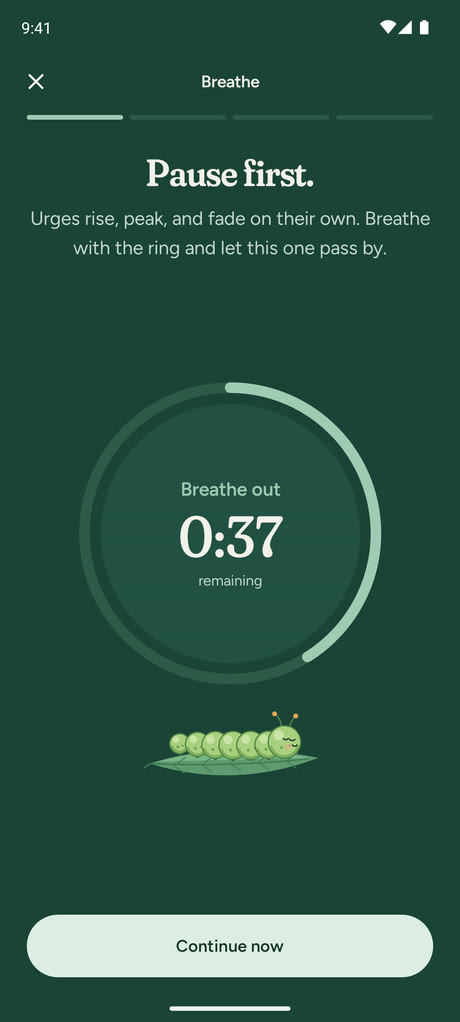
  1. Breathe: Pause first. A ring counts down the time left while the caterpillar rests, eyes closed.

    Breathe

    In for four, out for six, with gentle vibrations if you like them. Pip breathes with you.

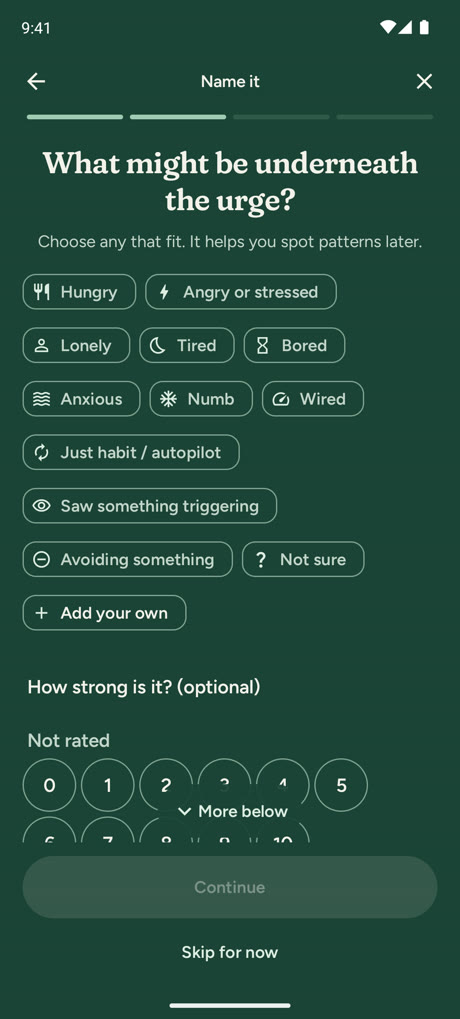
  2. Name it: What might be underneath the urge? Choices such as Hungry, Angry or stressed, Lonely, Tired, Bored, Anxious, and Not sure, with a 0 to 10 strength scale below.

    Name it

    Tired, lonely, stressed, bored. It helps you spot patterns later, and "Not sure" is always an answer.

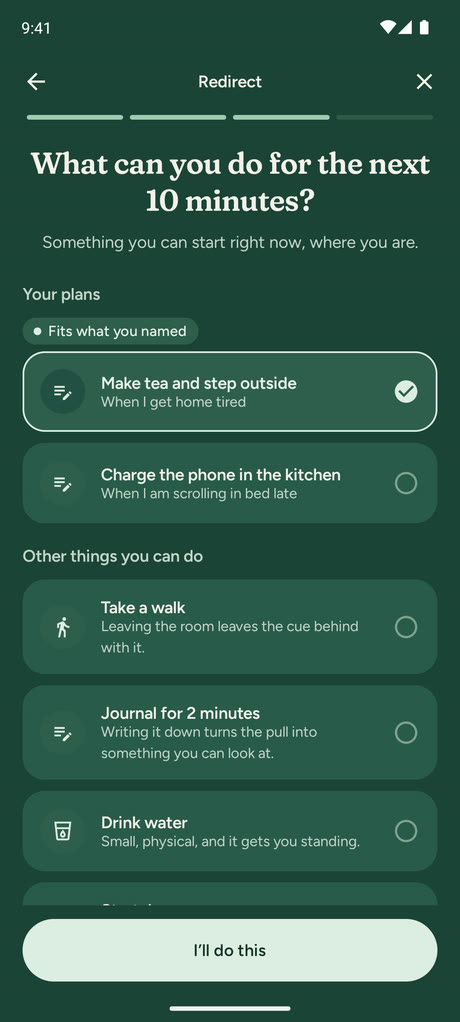
  3. Your plan: your own if-then plans come first, with the one that fits what you named selected.

    Your plan

    Pick a plan you wrote on a better day. The ones that fit what you named come first.

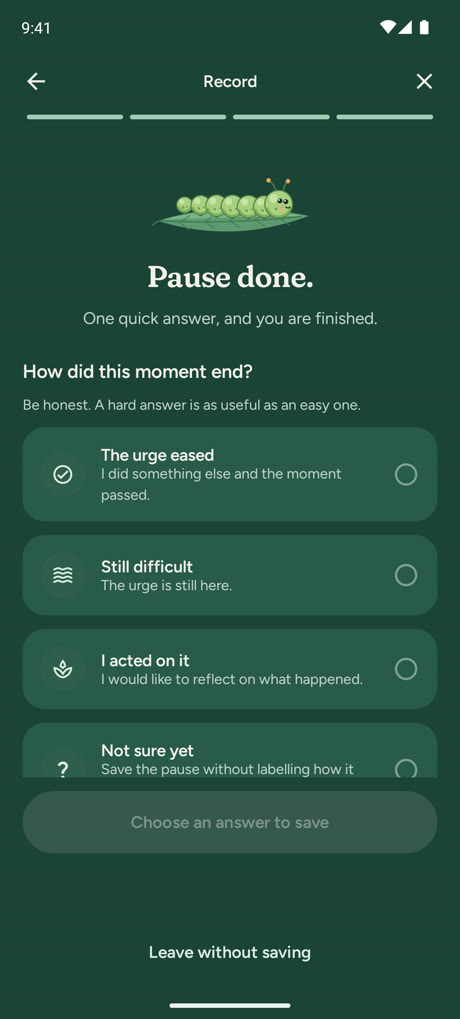
  4. Record: Pause done. How did this moment end? The urge eased, Still difficult, I acted on it, or Not sure yet. Be honest: a hard answer is as useful as an easy one.

    Record

    Note how it ended, as information, never as a verdict. A hard answer is as useful as an easy one.

Plans written on a better day.

If-then plans are one of the better-studied ways to change a habit. You write them when you're calm. When an urge arrives, they're the first thing you see.

  • Suggestions drawn only from what you logged, never invented.
  • See which plans you used and how those moments ended, on the plans list behind your app lock.
  • Twenty short lessons to read in a few minutes, and a toolbox with a 60-second urge surf.

When I'm scrolling in bed late, I will charge the phone in the kitchen.

When I get home tired, I will make tea and step outside.

Two plans written for the app's screenshots. Yours will be your own.

Nothing resets.

Redirect counts up. One hard night erases nothing.

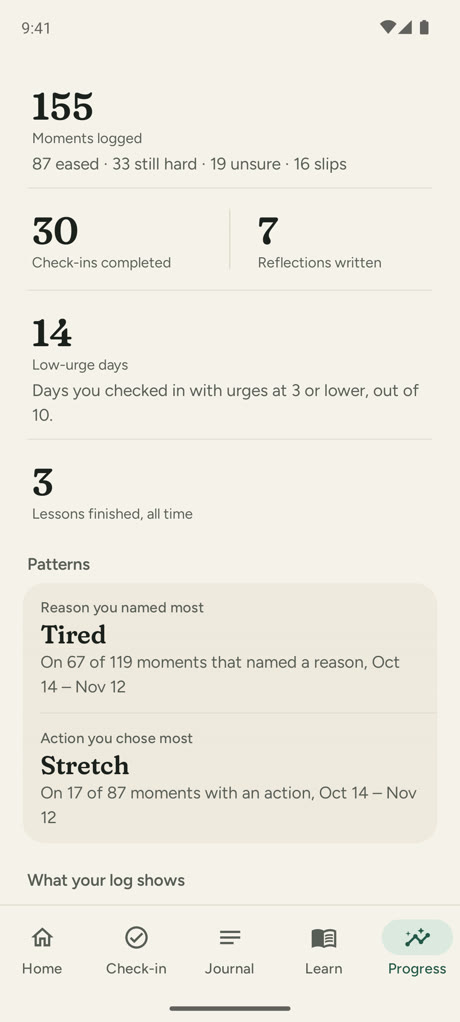
  • Counts of moments logged and how they ended, check-ins, reflections, and low-urge days, for 7, 30, or 90 days or all time.
  • The reason you named most and the action you chose most, drawn only from what you logged.
  • Quick check-ins, a private journal, and an optional weekly look back.
  • No streaks to lose, no scores, no judgement.

Showing up again is the streak.

Why Redirect has no streaks

Progress: 155 moments logged, 30 check-ins, 7 reflections, 14 low-urge days and 3 lessons finished, with Tired as the reason named most and Stretch as the action chosen most. Example data.
Example data.

Guardrails, with their limits in plain view.

Redirect works without any special access. Every guardrail is off until you turn it on, and each one's limits are shown as clearly as what it does.

Site blocking

What it does

An on-device VPN compares DNS lookups with the community-maintained OISD list of known adult domains. Your personal allowlist always wins. Android shows a VPN indicator while it is on. When a site is blocked, a quiet notification can offer a pause.

Where it stops

Private DNS, custom resolvers, IPv6 DNS, DNS-over-TCP, and some apps can bypass it. Redirect does not inspect images, video, or page content.

App pauses

What it does

For apps you select, Redirect can observe the foreground package name and offer the pause flow before you continue.

Where it stops

The pause can be passed through and the service can be disabled. It does not read screen text, take screenshots, type, or perform gestures.

Protection changes can use a cooldown you set ahead of time: friction chosen by your calm self for a moment when decisions feel harder. How blocking works

Your phone is the boundary.

There is no Redirect account, no analytics or advertising SDK, and no app-managed cloud sync. Journals, check-ins, urge history, and settings live in app-private storage on your device.

On your phone

  • Journal
  • Check-ins
  • Plans
  • Patterns

No account. No cloud. Export or erase any time.

The only two things Redirect sends across it

  1. DNS questionsto your phone's usual DNS (your network, or your Private DNS provider), only while site blocking is on.
  2. A blocklist update you requestfrom the OISD list host, only when you tap Update now.

Anything else leaves only if you export or share it yourself.

There is no Redirect server.

Inside your phone: journal, check-ins, plans, and patterns. Redirect itself sends only two things across it: DNS questions to your phone's usual DNS while site blocking is on, and a blocklist update when you request one. Anything else leaves only if you export or share it yourself. There is no Redirect server.

Stored locally

App data stays in private storage, with screenshots, Recents previews, and Android app-data backups restricted.

Yours to export

Create a readable JSON export at a destination you choose. The exported file then lives outside Redirect.

Yours to erase

Delete journals, check-ins, urge events, profile details, allowlists, and protection settings from inside the app.

The honest fine print: permitted DNS questions are handed to Android's own resolver, so your Android DNS settings apply, and a blocklist update you request contacts the OISD host over HTTPS. DNS traffic and exported files are explained in full in the privacy policy.

This website sets no cookies and loads nothing from anyone else.

What Redirect can and can't do.

Limits belong in the open, stated as clearly as the benefits.

Redirect can

  • Start a pause from the app, a Quick Settings tile, or a home-screen widget: breathe, name what's underneath, and choose one thing to do for the next ten minutes.
  • Put the if-then plans you wrote in a calm moment first when an urge arrives.
  • Block known adult domains with an optional on-device VPN, using the OISD list. Android shows a VPN indicator while it is on.
  • Show your pause before apps you choose, using Android Accessibility to see only which app is open.
  • Keep check-ins, your journal, and your patterns on your phone, with no account, and let you export or delete all of it.

Redirect can't

  • Block everything. Secure DNS in some browsers, other VPNs, and some apps can bypass site blocking.
  • Look at images or video.
  • Stop you turning it off for good. It is not tamper-proof software: every protection is off until you turn it on. On the default level it turns off straight away; a stricter level waits for the delay you chose, and uninstalling always removes it.
  • Replace medical treatment or crisis support, or act as parental control. It is a self-support tool for the adult using it.

Try it quietly, if it feels right.

Redirect is nearly ready, and it is free on Google Play. The pause, check-ins, lessons, and journal need no special access; the protection tools are optional and stay off until you turn them on.

Android 11 or later. Free. No account. More features will come in updates.